Mostrando entradas con la etiqueta toma de pedido. Mostrar todas las entradas

viernes, 4 de octubre de 2024

Poner un chat de gpt en mi pagina web paso a paso y gratis

 Hola a continuación le dejo material para que puedan implementar un widget chatbot que trabaja con google sheet , app script y chatgpt 

URL Sheet Plantilla


Link crear api key openia

Codigo para incrustar 
.................................

<!--Inicio del Script de Chat-->
    <script type="text/javascript">
        (function() {
             initChatWidget();
        })();

        function initChatWidget() {
            var chatButton = document.createElement("div");
            chatButton.style.position = "fixed";
            chatButton.style.bottom = "20px";
            chatButton.style.right = "20px";
            chatButton.style.backgroundColor = "#007bff";
            chatButton.style.color = "white";
            chatButton.style.padding = "10px";
            chatButton.style.borderRadius = "50%";
            chatButton.style.cursor = "pointer";
            chatButton.style.boxShadow = "0 0 10px rgba(0, 0, 0, 0.2)";
            chatButton.style.fontSize = "16px";
            chatButton.innerHTML = `<svg width="32px" height="32px" viewBox="0 0 5.12 5.12" xmlns="http://www.w3.org/2000/svg"><g fill="none" fill-rule="evenodd"><path cx="16" cy="16" r="16" fill="#1C98F7" d="M5.12 2.56a2.56 2.56 0 0 1 -2.56 2.56 2.56 2.56 0 0 1 -2.56 -2.56 2.56 2.56 0 0 1 5.12 0"/><path fill="#FFF" d="M2.605 3.732a1.92 1.92 0 0 0 0.333 -0.054 0.896 0.896 0 0 0 0.416 0.028l0.017 -0.001c0.049 0 0.115 0.029 0.21 0.09v-0.1a0.096 0.096 0 0 1 0.05 -0.085q0.062 -0.035 0.115 -0.08a0.576 0.576 0 0 0 0.216 -0.438q-0.001 -0.084 -0.026 -0.161 0.063 -0.117 0.1 -0.245a0.736 0.736 0 0 1 0.124 0.406c0 0.225 -0.105 0.435 -0.285 0.588a1.28 1.28 0 0 1 -0.095 0.071v0.234a0.099 0.099 0 0 1 -0.158 0.079 2.56 2.56 0 0 0 -0.192 -0.13 0.64 0.64 0 0 0 -0.059 -0.03q-0.082 0.012 -0.166 0.012c-0.226 0 -0.435 -0.068 -0.599 -0.181zM1.41 3.264c-0.285 -0.241 -0.45 -0.572 -0.45 -0.925 0 -0.722 0.682 -1.299 1.513 -1.299s1.514 0.577 1.514 1.299c0 0.723 -0.682 1.299 -1.514 1.299q-0.141 0 -0.276 -0.022c-0.039 0.01 -0.196 0.102 -0.422 0.267a0.124 0.124 0 0 1 -0.198 -0.099v-0.399a1.28 1.28 0 0 1 -0.167 -0.122m0.792 0.107q0.01 0 0.021 0.002 0.124 0.02 0.25 0.021c0.703 0 1.265 -0.477 1.265 -1.054s-0.563 -1.054 -1.265 -1.054c-0.702 0 -1.265 0.477 -1.265 1.054 0 0.279 0.131 0.543 0.364 0.739q0.088 0.074 0.191 0.133c0.038 0.022 0.063 0.063 0.063 0.106v0.23c0.179 -0.12 0.296 -0.177 0.377 -0.177m-0.374 -0.787a0.198 0.198 0 0 1 -0.198 -0.196c0 -0.108 0.089 -0.196 0.198 -0.196s0.198 0.088 0.198 0.196 -0.089 0.196 -0.198 0.196m0.645 0a0.198 0.198 0 0 1 -0.198 -0.196c0 -0.108 0.089 -0.196 0.198 -0.196s0.198 0.088 0.198 0.196 -0.089 0.196 -0.198 0.196m0.645 0a0.198 0.198 0 0 1 -0.198 -0.196c0 -0.108 0.089 -0.196 0.198 -0.196s0.198 0.088 0.198 0.196 -0.089 0.196 -0.198 0.196"/></g></svg>`;
            document.body.appendChild(chatButton);

            chatButton.onclick = function() {
                var chatModal = document.createElement("div");
                chatModal.style.position = "fixed";
                chatModal.style.bottom = "0";
                chatModal.style.right = "20px";
                chatModal.style.width = "400px";
                chatModal.style.height = "600px";
                chatModal.style.borderRadius = "10px";
                chatModal.style.boxShadow = "0 0 10px rgba(0, 0, 0, 0.3)";
                chatModal.style.backgroundColor = "#fff";
                chatModal.innerHTML = `
                    <div style="position: relative; width: 100%; height: 100%;">
                        <span style="position: absolute; top: 10px; right: 20px; cursor: pointer; font-size: 24px;" onclick="document.body.removeChild(this.parentElement.parentElement)">&times;</span>
                        <iframe src="tuurlgoogleappscript" style="width: 100%; height: 100%; border: none;"></iframe>
                    </div>
                `;
                document.body.appendChild(chatModal);
            };
        }
    </script>
    <!--Fin del Script de Chat-->

ASESORIA PERSONALIZADA :

En caso necesites alguna asesoría personalizada agéndame un espacio.

https://reservarasesoriaanlusoft.blogspot.com/

martes, 18 de octubre de 2022

BOT Telegram para toma de pedido

 Hola a continuación le dejo material para que puedan implementar un BOT en Telegram de Toma de Pedidp empleando hoja de calculo Google Sheet.

¿ Que necesitas para implementarlo ?

- Crear la hoja Google sheet como indica el video 

         - Crear BOT en telegram como indica el video

Video Implementación


Página Excel Plantilla


https://docs.google.com/spreadsheets/d/1bBL_hnLEY_7ZuvmaH-a66JOdA-vLrfWxy8J7NbxmfoE/edit?usp=sharing


Código AppScript 


En este link encontraran las fuentes mostradas en el Video del APP Script


https://anlusoftware.blogspot.com/?p=a913f147


ASESORIA o Consultas PERSONALIZADA :

En caso necesites alguna asesoría personalizada agéndame un espacio.

https://reservarasesoriaanlusoft.blogspot.com/

BOT Telegram para reenvio mensajes

 Hola a continuación le dejo material para que puedan implementar un BOT en Telegram empleando hoja de calculo Google Sheet.

¿ Que necesitas para implementarlo ?

- Crear la hoja Google sheet como indica el video 

         - Crear BOT en telegram como indica el video

Video Implementación


Página Excel Plantilla


https://docs.google.com/spreadsheets/d/1m9Kgdr6qHcoygzWKLxaXPm74wV43SyvAanbGzpmGJyg/edit?usp=sharing


Código AppScript 


function notificartelegran(mensaje, numero, api, token) {  

  try {

        var options =

             {

               'headers': {"Content-Type" : "application/json"},

               'method' : "POST",

               'payload' : JSON.stringify({

                 "method":"sendMessage",

                 "chat_id":numero,

                 "text":mensaje,

                 "parse_mode":"HTML",

               })

        };    

       var response = UrlFetchApp.fetch(api+token+"/", options);

        var json = JSON.parse(response.getContentText());

    } catch (e) {

    }

}

function enviar(messague) {


  var excel = SpreadsheetApp.getActiveSpreadsheet();

  var sheet_informacion = excel.getSheetByName("Informacion");

  sheet_informacion.appendRow([new Date(), messague]); 

  var mensaje_telegram = JSON.parse(messague);  

  var mensaje_buscar = "Te reenvio : "+ mensaje_telegram.message.text;

  var numero_enviar = mensaje_telegram.message.chat.id;

  var sheet_configuracion = excel.getSheetByName("Configuracion");

  var token = sheet_configuracion.getRange(1, 2).getValue();

  var api = sheet_configuracion.getRange(2, 2).getValue();

  notificartelegran(mensaje_buscar, numero_enviar,api,token);  

}


function doPost(e) {

    enviar(e.postData.contents);

}


ASESORIA o Consultas PERSONALIZADA :

En caso necesites alguna asesoría personalizada agéndame un espacio.
https://reservarasesoriaanlusoft.blogspot.com/

martes, 2 de agosto de 2022

Whatsapp API Business (Parte 4) ChatBot Toma Pedido

  Hola a continuación les dejo material para la cuarta parte de los tutoriales API whatsapp liberado en el mes de Mayo 2022 e integrarlo con Google Sheet les va permitir arnar un chatbots operativo 100 %

Video Implementación


Página Meta facebook


En la siguiente pagina pueden configurar sus plantillas y mensajes del API Whatsapp Business

https://developers.facebook.com/apps/?show_reminder=true


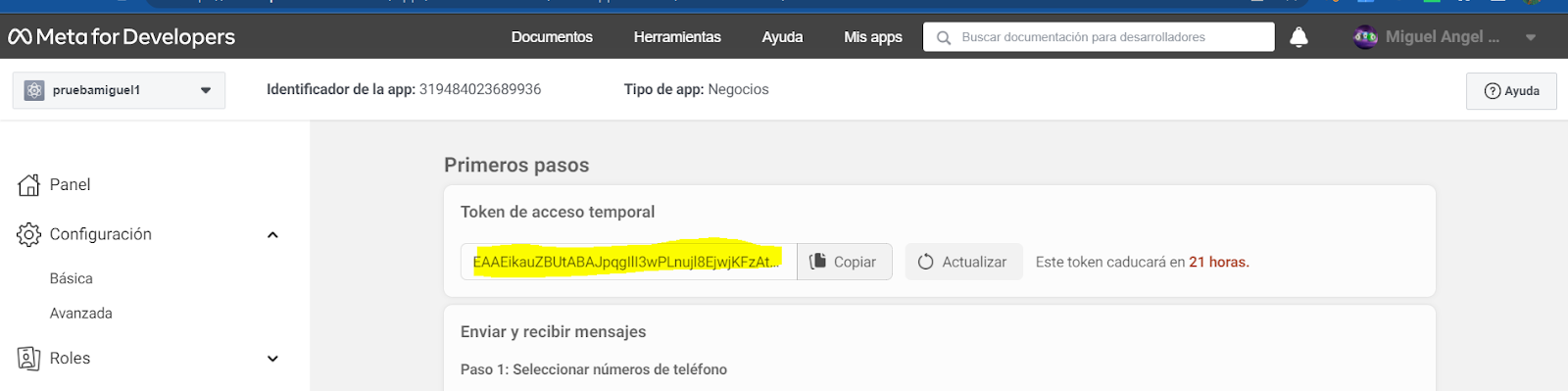
Y el token lo obtienen desde :


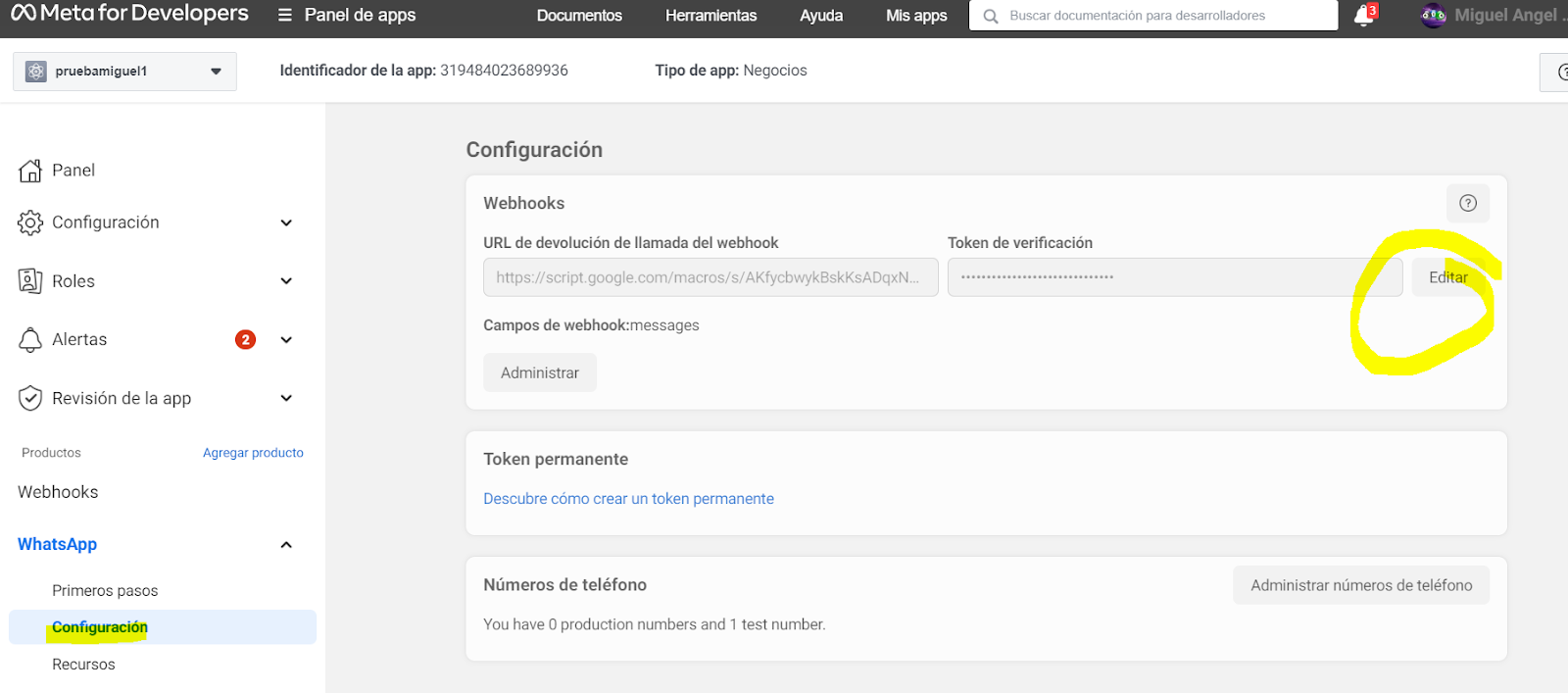
Configuracion webhook


Paso 1 : Configurar el webhook con la URL AppScript

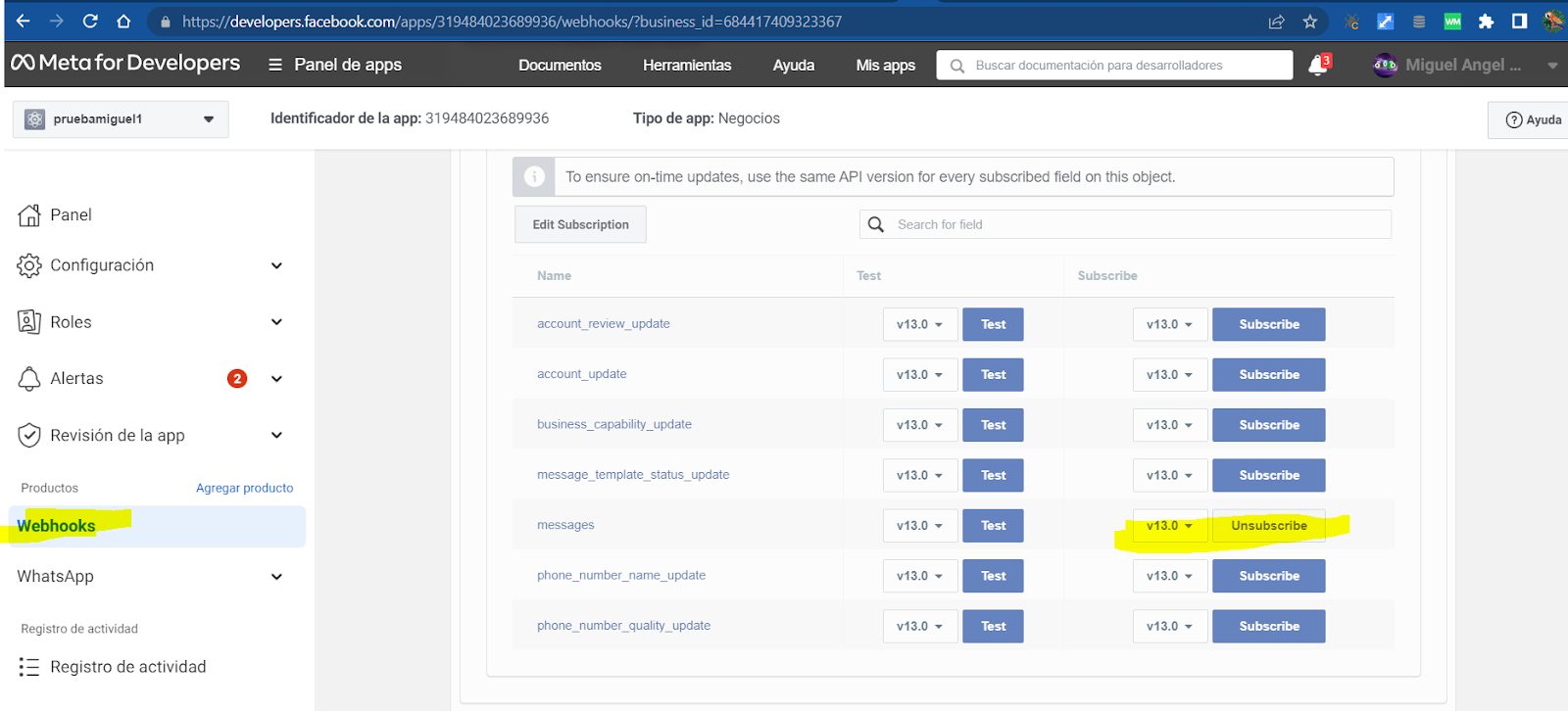
Paso 2 : Aceptar las notificaciones del tipo mensaje:

Plantillas meta creadas


https://business.facebook.com/wa/manage/message-templates


Para el BOT se han creado las siguientes plantillas


El detalle de cada plantilla se explica en el Video


Plantillas Google Sheet

https://docs.google.com/spreadsheets/d/1B-C8PRTe4voglUs_jPEAoqzQRhVMpc9cDQGWePLvud8/edit?usp=sharing


Código AppScript 


function notificarmeta(plantilla, salida, numero) {

var excel = SpreadsheetApp.getActiveSpreadsheet(); var sheet_configuracion = excel.getSheetByName("Configuracion"); try { var token = sheet_configuracion.getRange(1, 2).getValue(); var api = sheet_configuracion.getRange(2, 2).getValue(); var payload = JSON.parse(JSON.stringify({ "messaging_product": "whatsapp", "to": numero, "type": "template", "template": { "name": plantilla, "language": { "code": "es" }, "components": [] } })); var texto = []; if (salida) { texto = salida.split(":::"); } // SE AGREGA LOS PARAMETROS DE TEXTO if (texto.length > 0) { payload.template.components.push({ "type": "body", "parameters": [] }); for (var il = 0; il < texto.length; il++) { payload.template.components[0].parameters.push({ "type": "text", "text": texto[il] }); } } var options = { 'headers': { "Content-Type": "application/json", "Authorization": token }, 'method': "POST", 'payload': JSON.stringify(payload) }; var response = UrlFetchApp.fetch(api, options); var json = JSON.parse(response.getContentText()); } catch (e) { } } function enviar(numero_enviar, mensaje_buscar) { var jo = {}; /* se recupera la session del cached en caso exista*/ var cache = CacheService.getScriptCache(); var conversaciones = []; if (cache.get("conversaciones") != null) { conversaciones = JSON.parse(cache.get("conversaciones")); } // RECORREMOS LAS CONVERCACION PARA CONOCER EL EVENTO var excel = SpreadsheetApp.getActiveSpreadsheet(); var sheet_configuracion = excel.getSheetByName("Configuracion"); var sheet = excel.getSheetByName("Conversacion"); var rows = sheet.getRange(2, 1, sheet.getLastRow() - 1, sheet.getLastColumn()).getValues(); var evento = rows.find((item) => item[1].split(";").includes(mensaje_buscar)); var evento_error = rows.find((item) => item[0] === "bot_pedido_error"); if (evento === undefined) { var filtroconversacion = conversaciones.filter((item) => item.numero == numero_enviar); evento = evento_error; if (filtroconversacion.length > 0) { var evento_retorno = filtroconversacion[filtroconversacion.length - 1].retornar; var evento_retornar = rows.find((item) => evento_retorno != "" && item[0] === evento_retorno); if (evento_retornar !== undefined) { evento = evento_retornar; } } } var conversacion_ingresado = { numero: numero_enviar, mensaje_entrada: mensaje_buscar, evento: evento[0], retornar: evento[3], mensaje_salida: evento[2] }; if (conversacion_ingresado.evento == "bot_pedido_consultar_fin") { // SE RECUPERA EL DETALLE DE LA SOLICITUD conversacion_ingresado.mensaje_salida = "\\nSolicitud:" + conversacion_ingresado.mensaje_entrada + " No existe \\n" try { var sheet_solicitud = excel.getSheetByName("Solicitudes"); var rows_solicitud = sheet_solicitud.getRange(2, 1, sheet_solicitud.getLastRow() - 1, sheet_solicitud.getLastColumn()).getValues(); var mensaje_retornar = rows_solicitud.find((item) => (item[0] + "") === ("" + conversacion_ingresado.mensaje_entrada)); if (mensaje_retornar !== undefined) { conversacion_ingresado.mensaje_salida = "\\nSolicitud:" + conversacion_ingresado.mensaje_entrada + "\\nCliente:" + mensaje_retornar[5] + "\\nDireccion:" + mensaje_retornar[6] + "\\nPedido:\\n" + mensaje_retornar[4]; } } catch (e) { } } else if (conversacion_ingresado.evento == "bot_pedido_solicitar") { // SE RECUPERA EL DETALLE DE LA SOLICITUD conversacion_ingresado.mensaje_salida = "\\nError de productos \\n" try { var sheet_producto = excel.getSheetByName("Producto"); var rows_producto = sheet_producto.getRange(2, 1, sheet_producto.getLastRow() - 1, sheet_producto.getLastColumn()).getValues(); var texto = "\\n"; for (var i = 0; i < rows_producto.length; i++) { texto += rows_producto[i][0] + ") " + rows_producto[i][1] + " Precio : " + rows_producto[i][2] + " " + rows_producto[i][3] + "\\n"; } conversacion_ingresado.mensaje_salida = texto; } catch (e) { } } else if (conversacion_ingresado.evento == "bot_pedido_terminar_pedido") { // SE RECUPERA EL DETALLE DE LA SOLICITUD conversacion_ingresado.mensaje_salida = "\\nError detalle pedido productos \\n"; var sheet_producto = excel.getSheetByName("Producto"); var rows_producto = sheet_producto.getRange(2, 1, sheet_producto.getLastRow() - 1, sheet_producto.getLastColumn()).getValues(); try { var result_numero = conversaciones.filter(item => item.numero == numero_enviar); var detalle_pedido = ""; var sumatoria = 0; var producto_encontrado = {}; for (var i = 0; i < result_numero.length; i++) { if (result_numero[i].evento == "bot_pedido_producto") { producto_encontrado = rows_producto.find((item) => (item[0] + "") === ("" + result_numero[i].mensaje_entrada)); if (producto_encontrado !== undefined) { detalle_pedido += " producto : " + producto_encontrado[1]; } } if (result_numero[i].evento == "bot_pedido_continuar_pedido") { var subtotal = 0; if (producto_encontrado !== undefined) { subtotal = parseFloat(parseInt(result_numero[i].mensaje_entrada) * parseFloat(producto_encontrado[2])); } sumatoria += subtotal; detalle_pedido += " Subtotal : " + result_numero[i].mensaje_entrada + " x " + producto_encontrado[2] + " = " + subtotal + "\\n"; } } detalle_pedido += " TOTAL :" + sumatoria + "\\n"; conversacion_ingresado.mensaje_salida = detalle_pedido; } catch (e) { } } else if (conversacion_ingresado.evento == "bot_pedido_terminar_pedido_fin") { var fecha = Utilities.formatDate(new Date(), "GMT", "yyyy-MM-dd HH:mm:ss"); var excel = SpreadsheetApp.getActiveSpreadsheet(); var sheet_solicitud = excel.getSheetByName("Solicitudes"); var conversaciones_final = conversaciones.filter((item) => item.numero == conversacion_ingresado.numero); conversacion_ingresado.mensaje_salida = "Su numero de pedido es #" + (sheet_solicitud.getLastRow() + 1); conversaciones_final.push(conversacion_ingresado); var cliente = conversaciones_final.find((item) => item.evento == "bot_pedido_terminar_pedido_direccion"); if (cliente == undefined) { cliente = "Cliente"; } var direccion = conversaciones_final.find((item) => item.evento == "bot_pedido_terminar_pedido_fin"); if (direccion == undefined) { direccion = "Direccion"; } var pedido = conversaciones_final.find((item) => item.evento == "bot_pedido_terminar_pedido"); if (pedido == undefined) { pedido = "pedido"; } sheet_solicitud.appendRow([sheet_solicitud.getLastRow() + 1, fecha, conversacion_ingresado.numero, "Pendiente", pedido.mensaje_salida, cliente.mensaje_entrada, direccion.mensaje_entrada, JSON.stringify(conversaciones_final)]); } // SE PONE PUSH conversaciones.push(conversacion_ingresado); // SE ENVIA A META notificarmeta(conversacion_ingresado.evento, conversacion_ingresado.mensaje_salida, conversacion_ingresado.numero); // FIN DE ENVIO A META if (evento[0].includes("_inicio")) { var result_numero = conversaciones.filter(item => item.numero !== numero_enviar); if (result_numero === undefined || result_numero.length == 0) { conversaciones = []; } else { conversaciones = result_numero; } conversaciones.push(conversacion_ingresado); } cache.put('conversaciones', JSON.stringify(conversaciones), 120); jo.status = '0'; jo.message = ' Se grabo el registro'; jo.conversaciones = conversaciones; return JSON.stringify(jo); } function doPost(e) { var operacion = JSON.parse(e.postData.contents); var numero = operacion.entry[0].changes[0].value.messages[0].from; var mensaje = ""; if (operacion.entry[0].changes[0].value.messages[0].type == "text") { mensaje = operacion.entry[0].changes[0].value.messages[0].text.body; } else if (operacion.entry[0].changes[0].value.messages[0].type == "button") { mensaje = operacion.entry[0].changes[0].value.messages[0].button.text; } /* var excel = SpreadsheetApp.getActiveSpreadsheet(); var sheet_solicitud = excel.getSheetByName("Informacion"); sheet_solicitud.appendRow([numero, mensaje, new Date(), JSON.stringify(operacion)]);*/ var respuesta = enviar(numero, mensaje); return ContentService.createTextOutput(JSON.stringify(operacion)).setMimeType(ContentService.MimeType.JSON); } function doGet(e) { var cadena = e.parameter["hub.challenge"]; var excel = SpreadsheetApp.getActiveSpreadsheet(); var sheet_configuracion = excel.getSheetByName("Configuracion"); sheet_configuracion.getRange(7, 2).setValue(cadena); sheet_configuracion.getRange(8, 2).setValue(JSON.stringify(e)); var respuesta = { "status": "OK" }; return ContentService.createTextOutput(cadena).setMimeType(ContentService.MimeType.CSV); }


ASESORIA PERSONALIZADA :

En caso necesites alguna asesoría personalizada agéndame un espacio.
https://reservarasesoriaanlusoft.blogspot.com/


miércoles, 27 de julio de 2022

BOT Whatsapp de Toma de Pedido

 Hola a continuación le dejo material para que puedan implementar un BOT de Toma de Pedido empleando hoja de calculo google sheet.

¿ Deseas solo probarlo YA?

1) Ingresar a la siguiente pagina

https://anlusoftware.blogspot.com/

2) Seleccionar la opcion "GENERAR TOKEN WHATSAPP PARA BOT" y luego el BOT que deseas activar "Whatsapp chatbot toma pedido con google sheets"


3) Si todo esta OK se le mostrara mensaje confirmacion

4) Conversele al numero de celular .

5) El BOT trabaja con la siguiente hoja sheet se iran almacenado los registros ahi,

https://docs.google.com/spreadsheets/d/1INR9efCxwJlj7-B463VjBdcjzSTs5sAKr71Dm-ClZu8/edit?usp=sharing

¿ Necesitas implementarlo tu mismo para realizar cambios ?

- Crear la hoja Google sheet como indica el video 

         - Escanear la hoja para obtener token QR

        - Whatsapp version android no business

Video Implementación


Página Excel Plantilla


https://docs.google.com/spreadsheets/d/1INR9efCxwJlj7-B463VjBdcjzSTs5sAKr71Dm-ClZu8/edit?usp=sharing


Pasos de ejecución

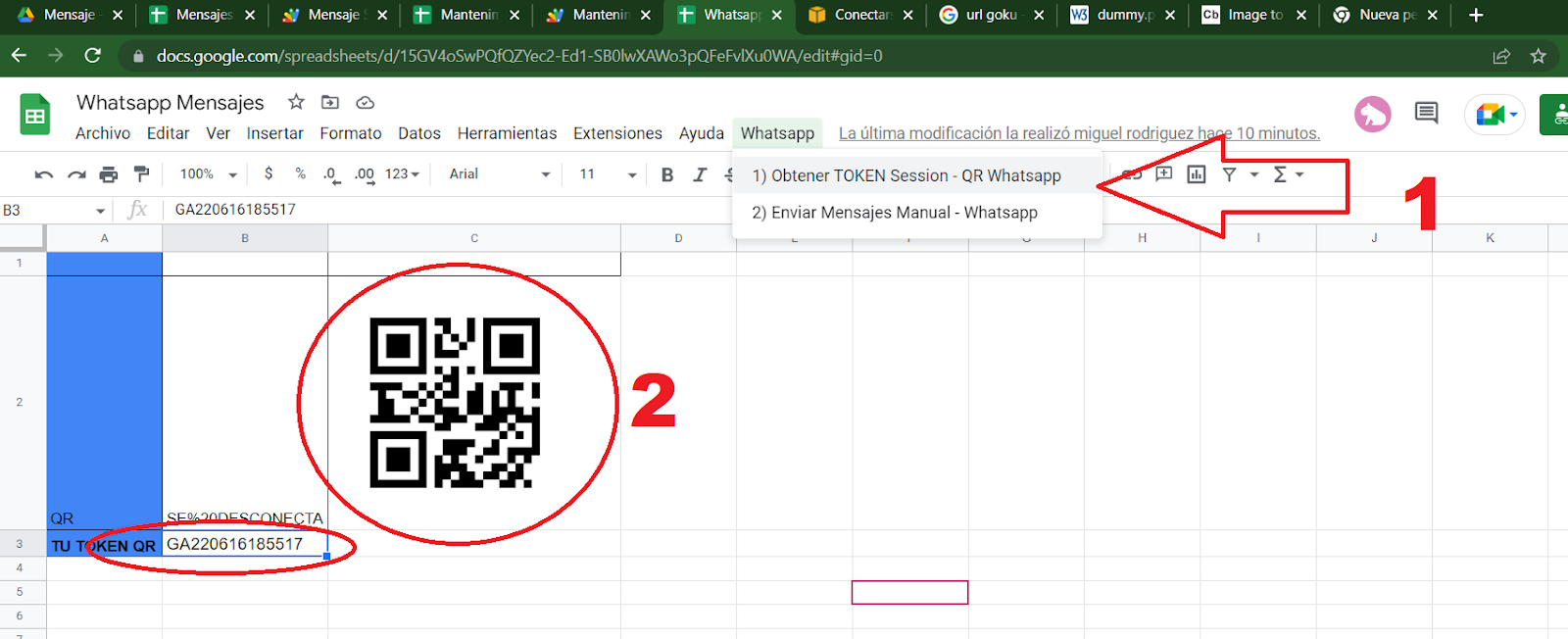
Luego de haber copiado el codigo appscript y desplegarlo , ejecutar la funcion onOpen y se mostrara un menu de opciones Whatsapp , iniciar con el paso 1 y se mostrara codigo QR que debe escanearlo con su Whatsapp y se obtendra token de session en la celda 3B

Luego ejecutar el paso 2 Menu Whatsapp se iniciara el BOT

Esperar 10 seg a que aparesca el menu Whatsapp , en caso no aparecer verificar que este logueado con tu cuenta de gmail

Código AppScript 


var excel_qr = SpreadsheetApp.getActiveSpreadsheet();

var sheet_qr = excel_qr.getSheetByName("Configuracion");

var api_interna = "https://script.google.com/macros/s/AKfycbyoBhxuklU5D3LTguTcYAS85klwFINHxxd-FroauC4CmFVvS0ua/exec";

var appscript = sheet_qr.getRange(1, 2).getValue();


function onOpen() {

    createMenus();

}


function createMenus() {

    var menu = SpreadsheetApp.getUi().createMenu("Whatsapp");

    menu.addItem('1) Obtener TOKEN Session - QR Whatsapp', 'qrwhatsapp');

    menu.addItem('2) Habilitar BOT - Whatsapp', 'enviarconversacion');

    menu.addToUi();

}


function doPost(e) {


    var operacion = JSON.parse(e.postData.contents)

    var respuesta = "";

    if (operacion.op == "qr") {

        respuesta = generar(JSON.stringify(operacion));

    }

    if (operacion.op == "find_conversacion") {

        respuesta = find_conversacion(JSON.stringify(operacion));

    }  

    return ContentService.createTextOutput(respuesta).setMimeType(ContentService.MimeType.JSON);

}


function find_conversacion(informacion) {


    try {

        var result, jo = {};

        var venta = JSON.parse(informacion);

        var excel = SpreadsheetApp.getActiveSpreadsheet();

        var sheet = excel_qr.getSheetByName("Pedido");

        var sheet_qr = excel_qr.getSheetByName("Configuracion");

        sheet_qr.getRange(2,9).setValue(informacion);

        var sheet_producto = excel.getSheetByName("Producto");

        var rows_producto = sheet_producto.getRange(2, 1, sheet_producto.getLastRow() - 1, sheet_producto.getLastColumn()).getValues();

        var fecha = Utilities.formatDate(new Date(), "GMT", "yyyy-MM-dd HH:mm:ss");

        var numero = (venta.numero).substring(0, (venta.numero).lastIndexOf("@"));

        var ultimoevento = "";

        var nombre_cliente = "";

        var direccion_cliente = "";

        var codigo_pedido = Utilities.formatDate(new Date(), "GMT", "ddHHmmss"); //new Date().getTime();

        var productos=[];

        for (var ill = 0; ill < venta.mensaje.length; ill++) {


          if(venta.mensaje[ill].evento=="Datos_Direccion"){

             nombre_cliente=venta.mensaje[ill].mensaje;

           }

           if(venta.mensaje[ill].evento=="FinSolicitarPedido"){

             direccion_cliente=venta.mensaje[ill].mensaje;

           }

           if(venta.mensaje[ill].evento=="FinConsultaPedido"){

             codigo_pedido=venta.mensaje[ill].mensaje;

           }          

           if (venta.mensaje[ill].evento == "Producto") {

                var codigo_producto = venta.mensaje[ill].mensaje;

                for (var i = 0, l = rows_producto.length; i < l; i++) {

                    if (("" + codigo_producto) == ((i+1) + "")) {

                      productos.push({"codigo":codigo_producto,"descripcion":rows_producto[i][0],"precio":rows_producto[i][1]});

                      break;

                    }

                }

            }

           if (venta.mensaje[ill].evento == "Continuar Pedido") {

                productos[productos.length-1].cantidad = venta.mensaje[ill].mensaje;

            }

            ultimoevento = venta.mensaje[ill].evento;

        }


        var mensaje_detalle="Tu detalle es :\n";

        if(ultimoevento == "Mostrar_Detalle_Pedido"  || ultimoevento == "FinSolicitarPedido"){

          var total=0.0;

          for (var i = 0; i < productos.length; i++) {

            mensaje_detalle+="*"+productos[i].descripcion+"* Cant."+ productos[i].cantidad+" x "+"S/"+""+productos[i].precio+"\n";

            var subtotal=Number.parseFloat(productos[i].cantidad)*Number.parseFloat(productos[i].precio);

            total=Number.parseFloat(Number.parseFloat(total)+Number.parseFloat(subtotal)).toFixed(2);

          }

          mensaje_detalle+="*Total* :"+"S/"+""+total;

        }  

        if (ultimoevento == "Mostrar_Detalle_Pedido") {

          jo.status = '0';

          jo.message = mensaje_detalle;

          jo.conversacion = { "mensaje": "", "evento": "Mostrar_Detalle_Pedido_Informacion", "retornar": "Datos_Nombre" };

        }

        if (ultimoevento == "FinSolicitarPedido") {

         sheet.appendRow([codigo_pedido,fecha,numero,"Pendiente",mensaje_detalle,nombre_cliente,direccion_cliente]);

          jo.status = '0';

          jo.message = "Su pedido ha sido registrado✅😃 con codigo pedido # *"+codigo_pedido+"*";

          jo.conversacion = { "mensaje": "@end@", "evento": "FinSolicitarPedido_informacion", "retornar": "" };

        }

         if(ultimoevento=="FinConsultaPedido"){

          var mensaje_consulta="No existe pedido # *"+codigo_pedido+"* ✅😃";

          var rows = sheet.getRange(2,1,sheet.getLastRow()-1, sheet.getLastColumn()).getValues(); 

           if(rows){

             for(var i = 0, l= rows.length; i<l ; i++){

               var dataRow = rows[i];

               if((dataRow[0]+"")===""+codigo_pedido){

                 mensaje_consulta = "El pedido # *"+codigo_pedido+"* ( "+dataRow[3]+" )\n";

                 mensaje_consulta+= dataRow[4];

                 break;

               }  

             }

          }

          jo.status = '0';

          jo.message = mensaje_consulta;

          jo.conversacion = { "mensaje": "@end@", "evento": "FinConsultaPedido_informacion", "retornar": "" };

       }


    } catch (e) {

        jo.status = '-1';

        jo.message = e.toString();

    }


    var result = JSON.stringify(jo);

    sheet_qr.getRange(9, 5).setValue(result);


    return result;

}


function generar(informacion) {


    try {

        var qr = JSON.parse(informacion);

        sheet_qr.getRange(2, 2).setValue(encodeURIComponent(qr.qr));

        var result, jo = {};

        if (qr.numero && qr.qr == "CONECTADO") {

            sheet_qr.getRange(3, 2).setValue(qr.session);

        }


        jo.status = '0';

        jo.message = ' Se grabo el registro';


    } catch (e) {

        jo.status = '-1';

        jo.message = e.toString();

    }

    var result = JSON.stringify(jo);

    return result;

}


function qrwhatsapp() {


    var response = "No"

    try {

//        sheet_qr.getRange(3, 2).setValue("");

        var response = Browser.msgBox('Seguro que quiere generar QR ahora ?', Browser.Buttons.YES_NO);

    } catch (e) {

        Browser.msgBox('La acción no se ha realizado', Browser.Buttons.OK);

    }


    if (response == "yes") {

        enviar();

        Browser.msgBox('La acción ha sido realizada , escanear registros luego de 10 segundos', Browser.Buttons.OK);

    }

}


function enviar() {


    var payload = { "op": "iniciarqr", "app_script": appscript,"sheet_id":excel_qr.getId(), "fechahora": Utilities.formatDate(new Date(), "GMT-5", "yyMMddHHmmss") };

    var options =

    {

        'headers': { "Content-Type": "application/json" },

        'method': "POST",

        'payload': JSON.stringify(payload)

    };

    try {

        var response = UrlFetchApp.fetch(api_interna, options);

        var json = JSON.parse(response.getContentText());

    } catch (e) {

    }

}


function enviarconversacion() {

    var response = "No"

    var token_session = "";

    try {

        token_session = sheet_qr.getRange(3, 2).getValue();

        var response = Browser.msgBox('Seguro que quiere habilitar el BOT con la conversacion , el token de session sera : ' + token_session + ' ?', Browser.Buttons.YES_NO);

    } catch (e) {

        Browser.msgBox('La acción no se ha realizado', Browser.Buttons.OK);

    }


    if (response == "yes") {

        var dataConversacion = [];

        var dataProducto = [];

        if(excel_qr.getSheetByName("Producto")){    

          var sheet_producto =excel_qr.getSheetByName("Producto");

          var rows_producto = sheet_producto.getRange(2,1,sheet_producto.getLastRow()-1, sheet_producto.getLastColumn()).getValues(); 

          for(var i1 = 0, l1= rows_producto.length; i1<l1 ; i1++){

            var dataRow = rows_producto[i1];

            var record = {};

            record['mensaje'] = "*"+(i1+1)+"*."+dataRow[0]+" ( S/"+dataRow[1]+" x Kg.)";

            dataProducto.push(record);     

          }

        }

        if (excel_qr.getSheetByName("Conversacion")) {

            var sheet = excel_qr.getSheetByName("Conversacion");

            var rows = sheet.getRange(2, 1, sheet.getLastRow() - 1, sheet.getLastColumn()).getValues();

            for (var i = 0, l = rows.length; i < l; i++) {

                var dataRow = rows[i];

                var record = {};

                record['evento'] = dataRow[0];

                record['entrada'] = dataRow[1];

                record['salida'] = JSON.parse(dataRow[2]);

                record['retornar'] = dataRow[3];

                dataConversacion.push(record);

            }

        }


        var payload = { "op": "registermessage", "token_qr": token_session, "conversacion": dataConversacion };

        payload.data_1 =dataProducto;

        var options =

        {

            'headers': { "Content-Type": "application/json" },

            'method': "POST",

            'payload': JSON.stringify(payload)

        };

        try {

            var response = UrlFetchApp.fetch(api_interna, options);

            var json = JSON.parse(response.getContentText());

            if (json.status == "0") {

                Browser.msgBox('Se habilito el BOT inicie la conversacion ', Browser.Buttons.OK);

            } else {

                Browser.msgBox('Error al iniciar : ' + json.message, Browser.Buttons.OK);

            }

        } catch (e) {

            Browser.msgBox('Se habilito el BOT inicie la conversacion ', Browser.Buttons.OK);

        }

    }

}


HABILITAR BOT 24 x 7 :

La solución BOT emplea Web Whatsapp  para recibir y enviar mensajes , por lo cual es necesario la contratación de un servidor para el BOT este operativo 24 x 7  , debido a ello existe un pago mensual de $ 8.00 .

IR a PAGAR 8 DOLARES

ASESORIA PERSONALIZADA :

En caso necesites alguna asesoría personalizada agéndame un espacio.
https://reservarasesoriaanlusoft.blogspot.com/

🚀 Crea tu Propio Sistema de Inventario y Úsalo desde tu Celular 📱

 📱📦 Crea tu Sistema de Inventario y úsalo desde tu celular. En este video muestro cómo desarrollar un sistema de inventario con escáner us...